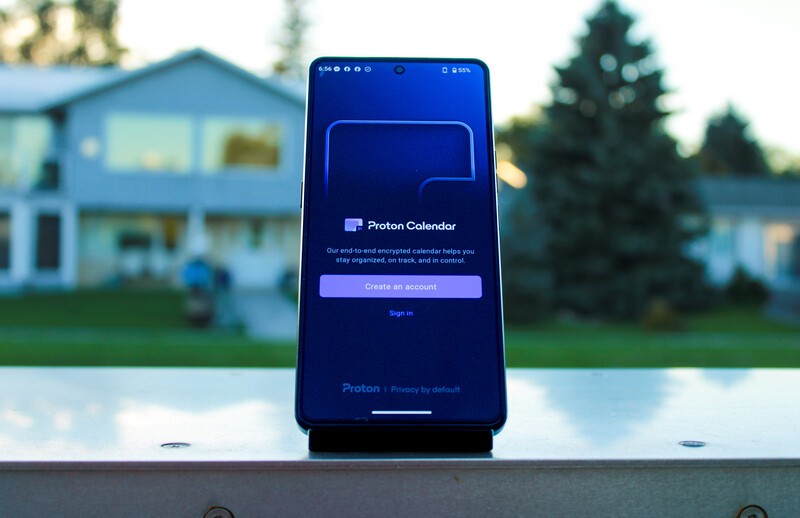
Swiss-based company Proton has a mission, to champion privacy and security as a right for all internet users. They do this by offering a suite of productivity apps to rival those offered by Big Tech companies like Google and Apple. With protection afforded by Swiss-privacy laws, which are amongst the strictest on the planet, Proton is a trusted partner of Apostrophy and AphyOS and thus the majority of their apps are available in the Vault on the MC03.
Executive Summary
- What is Proton? A Swiss-based company dedicated to internet privacy, security, and data sovereignty.
- What is Proton Calendar? Proton Calendar is the Google Calendar replacement from Proton, with an intuitive UI and additional security benefits compared to Google Calendar.
- End-to-End Encryption End-to-end encryption ensures only you and your intended viewers can see your calendar; not even Proton can read it.
- Free and Paid Proton Calendar is free to use but the paid version offers numerous enhanced features.
What is Proton Calendar?
Proton Calendar is the security-focused Google Calendar equivalent from Proton. It allows you to keep track of your schedule while keeping it secure and confidential.
Like all Proton products, Proton Calendar has end-to-end encryption between your device and Proton's servers in Switzerland. This means that even if Proton wanted to read your data, they can't because they do not hold an encryption key to unlock your data.
Like Gmail and Google Calendar, Proton Calendar is at its most effective when paired with Proton Mail.
Getting Started with Proton Calendar
To use Proton Calendar, you will need a Proton Mail account and address, which can be obtained for free.
- Navigate to the Proton Mail signup page.
- Select your plan (you can upgrade at any time).
- Create a username and choose your domain name: @proton.me or @protonmail.com.
- Set a strong password.
- Complete a verification check via CAPTCHA, or email.
- (Optional but highly recommended) Download or save your Recovery Phrase; without it you could lose permanent access to your Proton account should you lose your login information.
- Set your Display Name that people when see when you send them an email.
- Click "Let's get started".
- (Optional) Download the desktop app.
- (Optional) Download the app to your mobile device.
- Select your preferred look (default, dark mode, etc).
- Enjoy Proton!
Migrating Your Google Calendar to Proton
Proton makes it easy to move your Google Calendar information over to Proton Calendar with the Easy Switch tool. Use of this tool will result in a one-time import, it does not sync your calendars. Any new entries in the Google Calendar will not be reflected in your Proton calendar without completing a fresh import.
Mobile App
- Open the hamburger (three vertical line) menu on the upper left-hand side.
- Navigate to "Settings".
- Select "Import from Google".
- Select "New import".
- You will be prompted to grant access to Google Calendar. Select "Continue" to do so.
- Select the Google account you wish to import the calendar from.
- Select "Continue" on the "Sign in to Proton" prompt.
- Grant access for Proton to access your Google account by checking the "See and download any calendar you can access using your Google Calendar" box then select "Continue".
- Choose which calendars from the Google account you wish to import and select "Import X calendar" at the bottom of the screen.
- Your import will now be in progress. Click "Close", you do not need to wait for the import to be complete. The import may take some time depending on the amount of data in your Google Calendar; in cases of a very large amount of calendar entries it may take up to several days.
Desktop Site
- Click on the Settings (gear) icon on the upper right-hand side. If you don't see it expand the width of your browser window so it is visible.
- Click "All Settings".
- In the menu drawer on the left-hand side click "Import via Easy Switch".
- Select Google.
- To just import your calendar, deselect Emails and Contacts, then press Continue.
- On the Sign in and grant access tab, click Continue.
- Choose the Google account with the desired calendar.
- Complete the Google sign-in process.
- On the "Customize and confirm" screen ensure the calendar checkbox is selected and click "Start Import".
- Your import will now be in progress. Click "Close", you do not need to wait for the import to be complete. The import may take some time depending on the amount of data in your Google Calendar; in cases of a very large amount of calendar entries it may take up to several days.
Proton vs. Google Calendar Comparison
In terms of core functionality such as entering appointments, managing multiple calendars, sharing events, and integrating with their partner email apps, Proton Calendar and Google Calendar are very similar. Here is where they vary.
Proton Calendar is the more secure option of the two. With end-to-end encryption, nobody other than you and intended viewers can read your calendar. Proton itself cannot read it. As a result, your data cannot be used to sell you advertisements, which is even less of a concern with Proton since Proton is advertisement free.
Proton Calendar also supports sending meeting invitations using your e-mail aliases, protecting your true e-mail address from becoming compromised.
Google Calendar has some conveniences unavailable to Proton users, but it requires allowing Google to read your data. Some examples include scanning your email to automatically add events to your calendar without requiring manual entry, Google Drive integration allowing for easy file attachment (Proton Calendar does not support attachments at this time), and more granular permission control over shared events.
Google Calendar also offers unlimited calendars for free, while Proton only permits one, but remember that you are paying for that convenience in other ways.
Free vs Paid versions of Proton Calendar
As with all Proton products, the free and paid versions feature the exact same security standards. Proton believes internet privacy and security is a right, not a privilege, and ensures all users enjoy the same protection.
Both versions support calendar sharing, sending and receiving invitations, and multiple calendars; 3 for the free version, 25 for the paid.
The paid version has the following advantages over the free one: - 25 calendars compared to 3. - Ability to create booking pages to allow others to book meetings with you. - Custom domain integration, allowing you to connect your own domain to the calendar. - Faster customer service response times.
Is Proton Calendar Right For You?
Proton Calendar is a fully functional and easy to use calendar option for users who want to maintain the security of their data and integrate with other Proton services like Proton Mail. For many users, the free version has all the features one would need, so there's no reason not to try it out!
If you're ready to upgrade to the paid version, be sure to use the referral link to earn $20 USD in credit with Proton to use towards your next subscription renewal.
Read more
Welcome to Proton Drive
Proton Drive is a privacy-focused, end-to-end encrypted equivalent to Google Drive. Offered in free and paid versions, the article explains how to sign up for the service, delves into some of its key features, and compares the free and paid versions of the Proton drive app.
Welcome to Proton Mail
Proton Mail is the privacy-focused mail application from Swiss-company Proton. Proton has a mission to promote internet privacy and data sovereignty as a right for all internet users. The article goes into a number of features in Proton Mail and instructions on how to use them.

Why you want to pay for Proton (and maybe why you don't)
Proton provides a suite of productivity applications that combine convenience and ease of use with enhanced data protection and privacy. Explore why upgrading from the free Proton apps to the paid versions is likely right for many users, but maybe not all.
Proton Just Revealed How Many Data Requests They Refused This Year
As part of that commitment to transparency, Proton regularly publishes a report on how many court-ordered data requests they receive, and how many have resulted in user data being provided.